
微服务/java微服务代码实例
定义:
微服务(Microservices)是一种 架构 ** 风格,它将单一的应用程序划分成多个小的、独立的、功能明确的服务,每个服务都可以独立部署和运行。每个微服务通常对应应用中的一个特定功能或业务模块,并且它们通过网络通信(如HTTP/REST、gRPC等)相互协作,组成一个完整的系统。
详细的微服务大家去访问其他博主的文章吧,百度百科啥的很清楚了,这里咱就说说代码实例
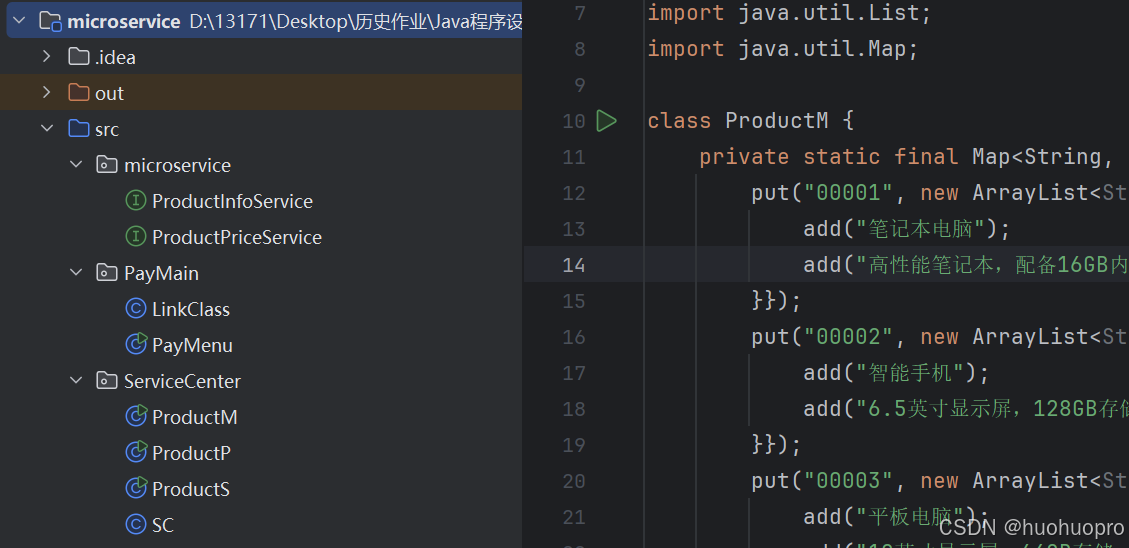
这个是一个基础的java实例,前端页面如下:
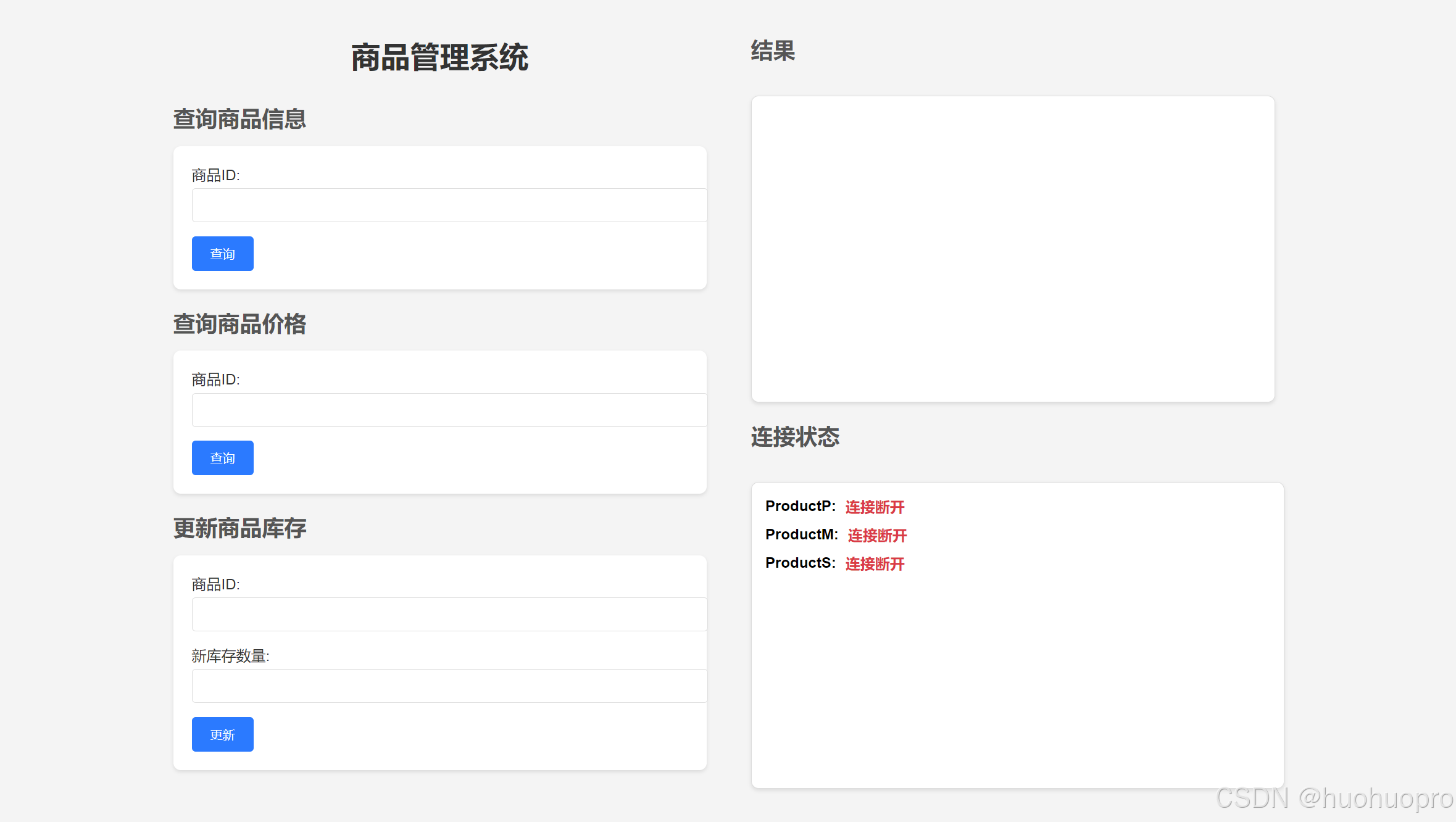
可以展示基础的分服务等内容,直接运行ServiceCenter中的程序就可以开端口运行服务,有S
M P三个服务,分别对应了查询商品信息,查询商品价格,购买,其中购买的post请求由于字段问题咱们可以不展示
有需求的资源自取。
。。。突然发现资源下载要vip,所以这里将 源码 ** 公开,有需求的可以粘贴,有点麻烦
两个接口(放到一起了,记得分开)
package microservice; import java.util.List; // 获取产品信息public interface ProductInfoService { List<String> getProductInfo(String productId);} package microservice;// 获取产品价格public interface ProductPriceService { double getProductPrice(String productId);}
三个服务
M:
package ServiceCenter; import java.io.*;import java.net.*;import java.util.ArrayList;import java.util.HashMap;import java.util.List;import java.util.Map; class ProductM { private static final Map<String, List<String>> productInfoMap = new HashMap<String, List<String>>() {{ put("00001", new ArrayList<String>() {{ add("笔记本电脑"); add("高性能笔记本,配备16GB内存和512GB固态硬盘"); }}); put("00002", new ArrayList<String>() {{ add("智能手机"); add("6.5英寸显示屏,128GB存储,48MP摄像头"); }}); put("00003", new ArrayList<String>() {{ add("平板电脑"); add("10英寸显示屏,64GB存储,附带手写笔"); }}); put("00004", new ArrayList<String>() {{ add("智能手表"); add("防水,心率监测,支持GPS定位"); }}); put("00005", new ArrayList<String>() {{ add("无线耳机"); add("主动噪声取消,最长30小时电池续航"); }}); }}; public static void main(String[] args) { try (ServerSocket serverSocketM = new ServerSocket(8080)) { System.out.println("Server started on port 8080..."); while (true) { // 接受客户端的连接请求 Socket clientSocket = serverSocketM.accept(); // 创建输入输出流 BufferedReader in = new BufferedReader(new InputStreamReader(clientSocket.getInputStream())); PrintWriter out = new PrintWriter(clientSocket.getOutputStream(), true); // 读取请求的第一行 String requestLine = in.readLine(); System.out.println("Request: " + requestLine); if (requestLine != null && requestLine.startsWith("GET")) { String[] requestParts = requestLine.split(" "); String path = requestParts[1]; if (path.startsWith("/product/")) { String productId = path.substring(9); List<String> productInfo = getProductInfo(productId); // 添加状态行和响应头 out.println("HTTP/1.1 200 OK"); out.println("Content-Type: text/plain; charset=UTF-8"); // 添加 CORS 支持 out.println("Access-Control-Allow-Origin: *"); out.println("Access-Control-Allow-Methods: GET, POST, OPTIONS"); out.println("Access-Control-Allow-Headers: Content-Type"); out.println(); // 空行,分隔响应头和响应体 if (productInfo != null) { out.println("商品名称: " + productInfo.get(0)); out.println("商品描述: " + productInfo.get(1)); } else { out.println("未找到该商品"); } } else { // 添加状态行和响应头 out.println("HTTP/1.1 404 Not Found"); out.println("Content-Type: text/plain; charset=UTF-8"); // 添加 CORS 支持 out.println("Access-Control-Allow-Origin: *"); out.println("Access-Control-Allow-Methods: GET, POST, OPTIONS"); out.println("Access-Control-Allow-Headers: Content-Type"); out.println(); // 空行,分隔响应头和响应体 out.println("请求的资源未找到"); } } // 关闭连接 clientSocket.close(); } } catch (IOException e) { e.printStackTrace(); } } private static List<String> getProductInfo(String productId) { return productInfoMap.get(productId); }}
P
package ServiceCenter; import java.io.*;import java.net.*;import java.util.HashMap;import java.util.Map; public class ProductP { // 商品价格信息 private final Map<String, Double> productPriceMap = new HashMap<String, Double>() {{ put("00001", 9999.0); put("00002", 1999.0); put("00003", 6999.0); put("00004", 699.0); put("00005", 99.0); }}; public static void main(String[] args) { ProductP server = new ProductP(); server.startServer(); } // 启动服务端 void startServer() { try (ServerSocket serverSocketP = new ServerSocket(8081)) { System.out.println("Product Price Service started on port 8081..."); while (true) { // 接受客户端的连接请求 Socket clientSocket = serverSocketP.accept(); // 创建输入输出流 BufferedReader in = new BufferedReader(new InputStreamReader(clientSocket.getInputStream())); PrintWriter out = new PrintWriter(clientSocket.getOutputStream(), true); // 读取请求的第一行 String requestLine = in.readLine(); System.out.println("Request: " + requestLine); if (requestLine != null && requestLine.startsWith("GET")) { String[] requestParts = requestLine.split(" "); String path = requestParts[1]; if (path.startsWith("/price/")) { String productId = path.substring(7); Double productPrice = getProductPrice(productId); // 添加状态行和响应头 out.println("HTTP/1.1 200 OK"); out.println("Content-Type: text/plain; charset=UTF-8"); // 添加 CORS 支持 out.println("Access-Control-Allow-Origin: *"); out.println("Access-Control-Allow-Methods: GET, POST, OPTIONS"); out.println("Access-Control-Allow-Headers: Content-Type"); out.println(); // 空行,分隔响应头和响应体 if (productPrice != null) { out.println("商品ID: " + productId); out.println("商品价格: " + productPrice + " 元"); } else { out.println("未找到该商品价格"); } } else { // 添加状态行和响应头 out.println("HTTP/1.1 404 Not Found"); out.println("Content-Type: text/plain; charset=UTF-8"); // 添加 CORS 支持 out.println("Access-Control-Allow-Origin: *"); out.println("Access-Control-Allow-Methods: GET, POST, OPTIONS"); out.println("Access-Control-Allow-Headers: Content-Type"); out.println(); // 空行,分隔响应头和响应体 out.println("请求的资源未找到"); } } // 关闭连接 clientSocket.close(); } } catch (IOException e) { e.printStackTrace(); } } // 获取商品价格 private Double getProductPrice(String productId) { return productPriceMap.get(productId); }}
S
package ServiceCenter; import java.io.*;import java.net.*;import java.nio.charset.StandardCharsets;import java.util.HashMap;import java.util.Map; public class ProductS { // 商品库存信息 private final Map<String, Integer> productStockMap = new HashMap<String, Integer>() {{ put("00001", 100); put("00002", 50); put("00003", 30); put("00004", 200); put("00005", 500); }}; public static void main(String[] args) { ProductS server = new ProductS(); server.startServer(); } // 启动服务端 void startServer() { try (ServerSocket serverSocketS = new ServerSocket(8082)) { System.out.println("Product Service started on port 8082..."); while (true) { // 接受客户端的连接请求 Socket clientSocket = serverSocketS.accept(); // 创建输入输出流 InputStream is = clientSocket.getInputStream(); OutputStream os = clientSocket.getOutputStream(); BufferedReader reader = new BufferedReader(new InputStreamReader(is)); PrintWriter out = new PrintWriter(os, true); // 读取请求行 String requestLine = reader.readLine(); System.out.println("Request: " + requestLine); if (requestLine != null) { // 获取请求方法和路径 String[] requestParts = requestLine.split(" "); String method = requestParts[0]; String path = requestParts[1]; // 读取请求头 Map<String, String> headers = new HashMap<>(); String line; while ((line = reader.readLine()) != null && !line.isEmpty()) { int colonIndex = line.indexOf(':'); if (colonIndex > 0) { String headerName = line.substring(0, colonIndex).trim(); String headerValue = line.substring(colonIndex + 1).trim(); headers.put(headerName, headerValue); } } // 处理 GET 请求 if ("GET".equals(method)) { if (path.startsWith("/stock/")) { String productId = path.substring(7); Integer productStock = getProductStock(productId); // 添加状态行和响应头 out.println("HTTP/1.1 200 OK"); out.println("Content-Type: text/plain; charset=UTF-8"); out.println("Access-Control-Allow-Origin: *"); out.println("Access-Control-Allow-Methods: GET, POST, OPTIONS"); out.println("Access-Control-Allow-Headers: Content-Type"); out.println(); if (productStock != null) { out.println("商品ID: " + productId); out.println("商品库存: " + productStock + " 件"); } else { out.println("未找到该商品库存"); } } else { out.println("HTTP/1.1 404 Not Found"); out.println("Content-Type: text/plain; charset=UTF-8"); out.println("Access-Control-Allow-Origin: *"); out.println("Access-Control-Allow-Methods: GET, POST, OPTIONS"); out.println("Access-Control-Allow-Headers: Content-Type"); out.println(); out.println("请求的资源未找到"); } } // 处理 POST 请求 else if ("POST".equals(method) && path.startsWith("/updateStock/")) { String[] pathParts = path.split("/"); if (pathParts.length == 3) { String productId = pathParts[2]; int contentLength = 0; if (headers.containsKey("Content-Length")) { contentLength = Integer.parseInt(headers.get("Content-Length")); } byte[] requestBodyBytes = new byte[contentLength]; int bytesRead = 0; while (bytesRead < contentLength) { int read = is.read(requestBodyBytes, bytesRead, contentLength - bytesRead); if (read == -1) { break; } bytesRead += read; } String requestBody = new String(requestBodyBytes, StandardCharsets.UTF_8); String[] bodyParts = requestBody.split("="); if (bodyParts.length == 2 && "newStock".equals(bodyParts[0])) { try { int newStock = Integer.parseInt(bodyParts[1]); boolean success = updateProductStock(productId, newStock); if (success) { out.println("HTTP/1.1 200 OK"); out.println("Content-Type: text/plain; charset=UTF-8"); out.println("Access-Control-Allow-Origin: *"); out.println("Access-Control-Allow-Methods: GET, POST, OPTIONS"); out.println("Access-Control-Allow-Headers: Content-Type"); out.println("Connection: close"); out.println(); out.println("商品库存更新成功!"); } else { out.println("HTTP/1.1 404 Not Found"); out.println("Content-Type: text/plain; charset=UTF-8"); out.println("Access-Control-Allow-Origin: *"); out.println("Access-Control-Allow-Methods: GET, POST, OPTIONS"); out.println("Access-Control-Allow-Headers: Content-Type"); out.println(); out.println("未找到该商品,库存更新失败!"); } } catch (NumberFormatException e) { out.println("HTTP/1.1 400 Bad Request"); out.println("Content-Type: text/plain; charset=UTF-8"); out.println("Access-Control-Allow-Origin: *"); out.println("Access-Control-Allow-Methods: GET, POST, OPTIONS"); out.println("Access-Control-Allow-Headers: Content-Type"); out.println(); out.println("无效的库存数量!"); } } } else { out.println("HTTP/1.1 400 Bad Request"); out.println("Content-Type: text/plain; charset=UTF-8"); out.println("Access-Control-Allow-Origin: *"); out.println("Access-Control-Allow-Methods: GET, POST, OPTIONS"); out.println("Access-Control-Allow-Headers: Content-Type"); out.println(); out.println("请求路径无效"); } } else { out.println("HTTP/1.1 405 Method Not Allowed"); out.println("Content-Type: text/plain; charset=UTF-8"); out.println("Access-Control-Allow-Origin: *"); out.println("Access-Control-Allow-Methods: GET, POST, OPTIONS"); out.println("Access-Control-Allow-Headers: Content-Type"); out.println(); out.println("请求方法不支持"); } } // 关闭连接 clientSocket.close(); } } catch (IOException e) { e.printStackTrace(); } } // 获取商品库存 private Integer getProductStock(String productId) { return productStockMap.get(productId); } // 修改商品库存 private boolean updateProductStock(String productId, int newStock) { if (productStockMap.containsKey(productId)) { productStockMap.put(productId, newStock); return true; } return false; }}
用于返回端口地址的sc控制中心(微服务理念)
package ServiceCenter;public class SC { public static String getMId() { return "127.0.0.1:8080"; } public static String getPId() { return "127.0.0.1:8081"; } public static String getSId() { return "127.0.0.1:8082"; } }
初始化购物系统
package PayMain; import ServiceCenter.SC; import static PayMain.LinkClass.updateProductStock;import static PayMain.LinkClass.getProductInfo; public class PayMenu { public static void main(String[] args) { System.out.println("欢迎使用购物车系统"); // 向服务中心请求IP地址(假设SC.getMId()返回一个IP地址或URL) String serverIp = SC.getMId(); String url = "http://" + serverIp + "/product/00001"; // 例如请求ID为00001的商品 // 调用静态方法获取商品信息 String response = getProductInfo(url); System.out.println("商品信息:\n" + response); String serverPIP = SC.getPId(); String urlP = "http://" + serverPIP + "/price/00002"; String responseP = getProductInfo(urlP); System.out.println("商品价格信息:\n" + responseP); // 发送修改请求 String serverSIP = SC.getSId();String updateUrl = "http://" + serverSIP+ "/updateStock/00001";String payload = "newStock=100";String response1 = LinkClass.updateProductStock(updateUrl, payload);System.out.println(response1); }}
请求处理后端
package PayMain; import java.io.*;import java.net.HttpURLConnection;import java.net.URL;import java.nio.charset.StandardCharsets; public class LinkClass { // 获取请求信息的通用方法 public static String sendRequest(String urlString, String method, String payload) { StringBuilder result = new StringBuilder(); try { // 创建URL对象 URL url = new URL(urlString); HttpURLConnection connection = (HttpURLConnection) url.openConnection(); // 设置请求方法,支持GET, POST等 connection.setRequestMethod(method); connection.setConnectTimeout(5000); // 设置连接超时为5秒 connection.setReadTimeout(5000); // 设置读取超时为5秒 // 如果是POST请求,添加payload到请求体中 if ("POST".equalsIgnoreCase(method) && payload != null && !payload.isEmpty()) { byte[] outputBytes = payload.getBytes(StandardCharsets.UTF_8); connection.setRequestProperty("Content-Type", "application/x-www-form-urlencoded"); // 表单提交格式 connection.setRequestProperty("Content-Length", String.valueOf(outputBytes.length)); connection.setDoOutput(true); // 支持输出流,用于POST请求<div class="h[Truncated]